إدارة ملفات تعريف الارتباط المستخدمة للإعلان، مثل تخصيص الإعلانات وتجديد النشاط التسويقي وتحليل أداء الإعلان.
2.5.2.2.2.1. Configure FTP connection in Total Commander
Attention!
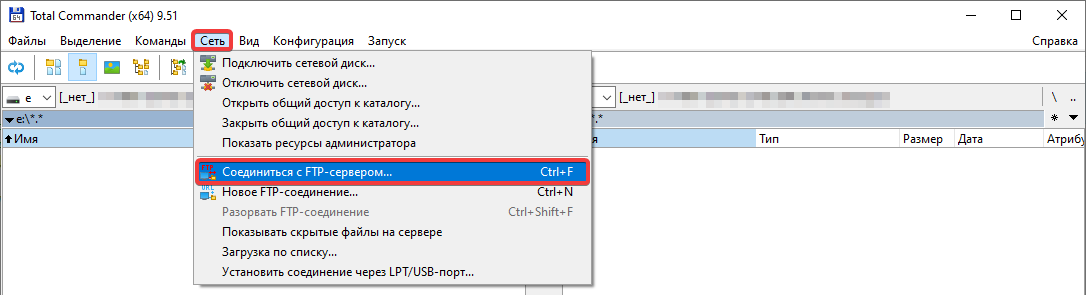
Before connecting, check the FTP security settings — the IP address from which the connection will be made should be added to the allowed list, or access restrictions should be disabled.- In the main menu, select "Net → FTP Connect" or press the Ctrl+F combination:
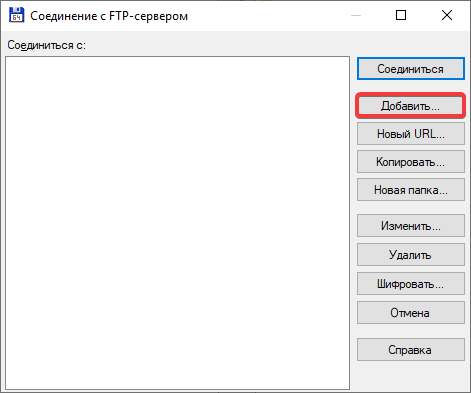
- Click "New connection":
- On the "General" tab, specify the connection settings:
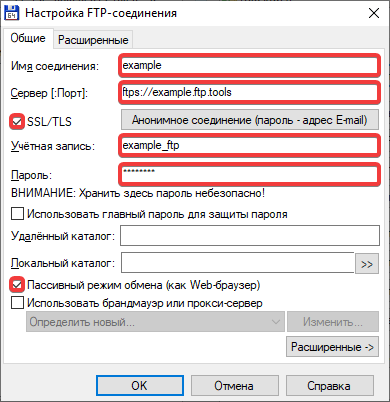
- "Session" — an arbitrary name for the connection. For example, the name of the site, FTP user, or hosting account.
- "Host name [:Port]" — FTP host. Since the connection is made through the standard port
21, it can be omitted. - "SSL/TLS" — enable for encryption use. In case of connection issues, disable to use a regular connection without encryption.
- "User name" — FTP user login.
- "Password" — FTP user password.
- "Use passive mode for transfers (like a WWW browser)" — mandatory enable.
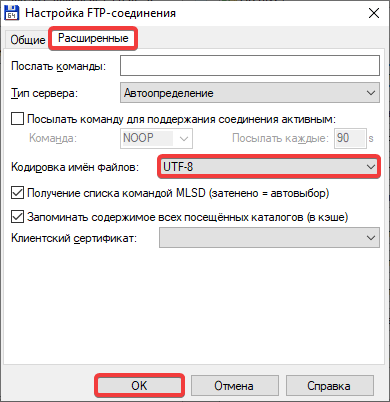
- On the "Advanced" tab, in the "Encoding of file names" field, select "UTF-8" and click "OK":
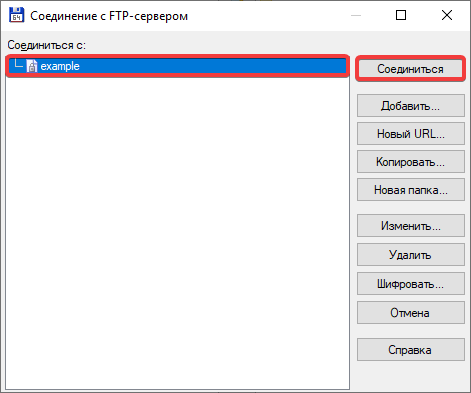
- Select the created connection from the list on the left and click "Connect":
- Enable binary data transfer mode.