إدارة ملفات تعريف الارتباط المستخدمة للإعلان، مثل تخصيص الإعلانات وتجديد النشاط التسويقي وتحليل أداء الإعلان.
2.14.1.9. Configure HTTPS in WordPress
Starting with version 5.7, WordPress HTTPS migration is significantly simplified. You can switch site to secure protocol in literally one click — WordPress automatically fixes protocol in all URLs. Whenever possible, CMS automatically handles mixed content errors.
Attention!
Automatic URL update is impossible if site URLs are set in constants. In this case, you must update the protocol manually.- Check if an SSL certificate is installed in SSL settings. If the certificate is not installed, install it.
- Disable HTTP/HTTPS redirect. This is necessary to avoid cyclic redirect during configuration.
- Open the admin panel of the site.
- Go to "Tools → Site Health".
- In the report, expand "Your website does not use HTTPS" and click "Update your site to use HTTPS".
- Check the site operation.
- Check if an SSL certificate is installed in SSL settings. If the certificate is not installed, install it.
- Disable HTTP/HTTPS redirect. This is necessary to avoid cyclic redirect during configuration.
- In site admin panel (not in hosting control panel) in "Settings → General" section in addresses (URL) instead of
http://protocol specifyhttps://: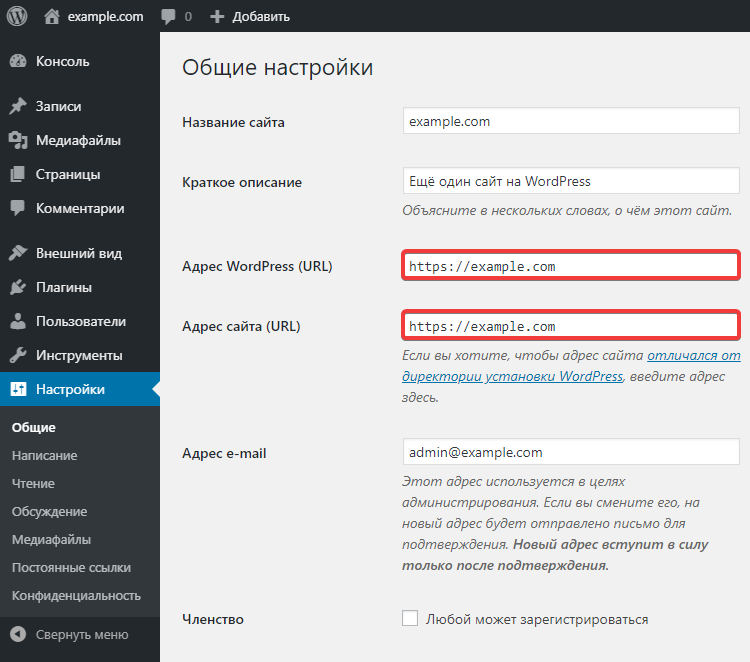
- Check the site is working properly by opening it over HTTPS.
- If everything is in order, enable redirect to HTTPS.
- Check the site operation again.
In most cases, the actions described above are sufficient to enable HTTPS on your site.
If HTTPS issues occur due to "Mixed Content" errors, use the instructions.
Video
(8)